
OmniFi v2026.4: Dashboards, APIs and more
v2026.4 extends and improves OmniFi in several areas. You can use Dashboards to organize your daily routines, extension administration has moved on to the web portal, OmniFi Access provides many new APIs and experience for Quantum users is enhanced.
Dashboards
With OmniFi v2026.4, the configurable Home landing page introduced in v2026.2 grows into a proper dashboard you can organize your day around.
Your Home screen supports multiple dashboards, so your morning checks don't have to share a screen with month-end or monitoring widgets. Widgets on the same tab can also share information, which means selecting a portfolio or an entity in one card can drive what the cards around it show.
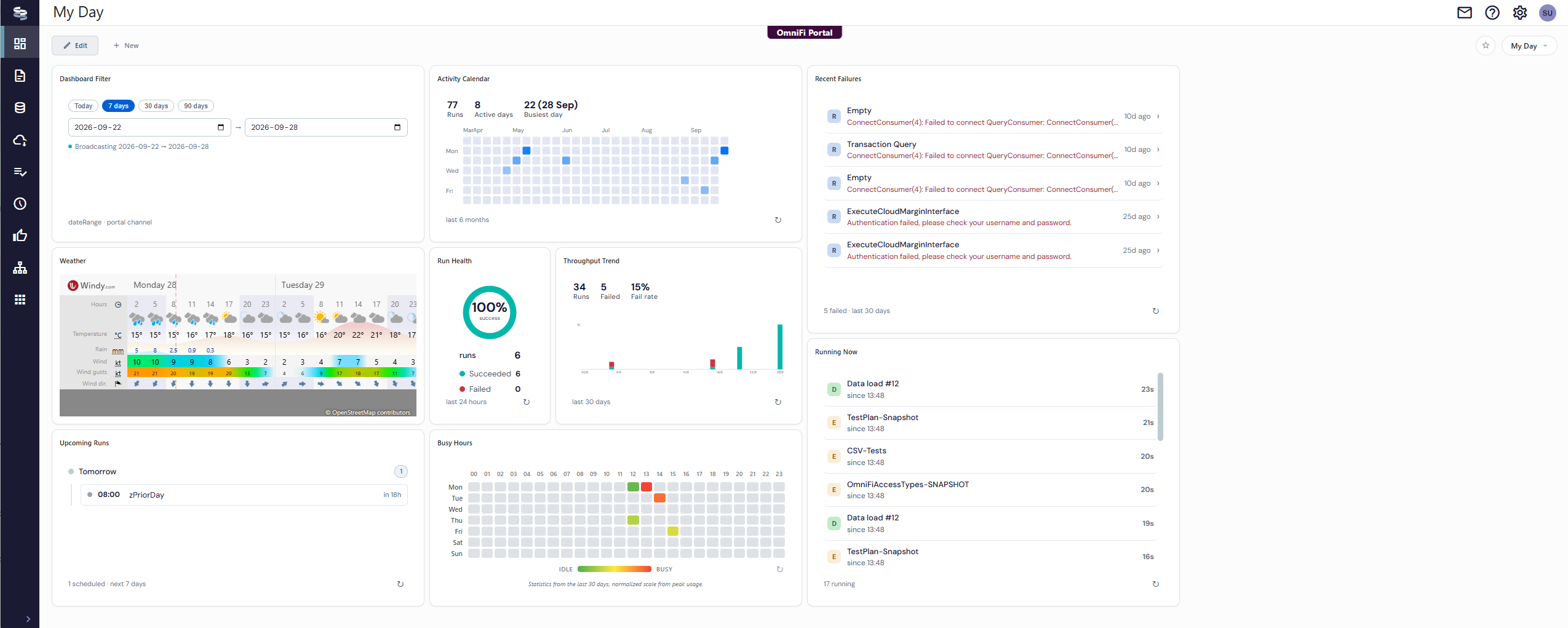
The main enhancements to the dashboard are:
- You can configure multiple dashboards and switch freely between them to keep what is important right now at the center of your view.
- You can share your dashboard designs with your team and colleagues. If it's useful, share it!
- Widgets are now interconnected and can share information. What you select in one widget drives what you see in other widgets, for an interactive dashboard experience.
Extension administration in the web portal
Extension administration has moved from the OmniFi Administration app to the web portal. Administrators no longer require a full desktop installation only to manage extensions, making the process much more conventient.
Extension onboarding and configuration is available on the Manage Extensions page.
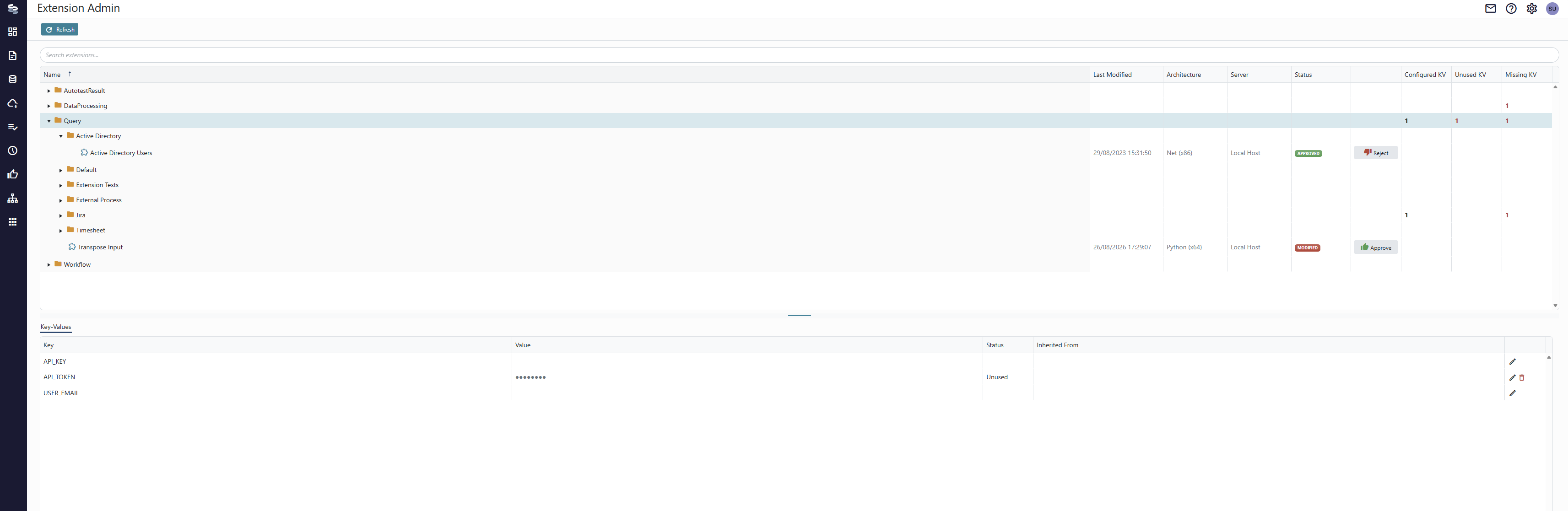
Here you can approve extensions and configure parameters.
Extension permissions and account mapping is available as a tab on the User Admin page, alongside the permission handling you already know.
The OmniFi Administration app remains available for use when you don't have the Web portal.
OmniFi Access enhancements
OmniFi Access is extended to a full CRUD (Create-Read-Update-Delete) API, so you can create, update and delete through the API as well. This is very convenient for writing end-to-end automation scripts, or if you build custom apps.
Two entities are completely new.
- Holiday calendars, so you can read a calendar with its bank holidays and maintain them through the API, including uploading a holiday file.
- Groups for reports, tasks, endpoints and workflows, which is what apps and widgets need to build a tree view.
| Entity | Read | Write |
|---|---|---|
| Reports | ● | ✓ |
| Report layouts | ● | ✓ |
| Report tasks | ● | ✓ |
| Report datasets | ● | ✓ |
| Custom endpoints | ● | ✓ |
| Custom endpoint tasks | ● | ✓ |
| DataMart tasks | ● | ✓ |
| Schedules | ● | ✓ |
| Workflows | ● | ✓ |
| Workflow tasks | ● | ✓ |
| Holiday calendars | ✓ | ✓ |
| Groups (report, task, endpoint, workflow) | ✓ | ✓ |
| Report logs | ● | n/a |
| Other logs, DataMart tables, export repositories | ● | n/a |
● Previously available ✓ New n/a Not available
On the authentication side, OmniFi Access and OmniFi MCP now support OAuth 2, following the MCP authorization specification and RFC 9728. The API tokens, basic authentication and cookie authentication you use today keep working, and any authentication method added to Access is automatically accepted by MCP.
Enhancements for Quantum users
Based on user feedback, OmniFi v2026.4 has been enhanced with several new features for Quantum users.
The Quantum site name can now be set in the system configuration file, and used with account mappings. The site name can be used in data source mappings, making them portable between Quantum sites. This is very convenient for migration project running several temporary Quantum environments on one server.
Date parameters and criteria are easier to configure. Report parameters now has a new Date parameter type that uses pure yyyy-MM-dd format. Filter criteria values can be formatted as either Date or Date & Time.
Type conversion in reports can now detect dates and numbers in the string columns that EWF OData endpoints return.
The standard installation also ships a fuller RptProgramParameter.csv, with core parameters already filled in for many additional Quantum standard reports.
MCP enhancements
OAuth 2.0 support
OmniFi MCP and Access API now support OAuth 2.0 authentication. OmniFi MCP and Acces API are the protected resources, and compatible clients obtains access tokens from a designated authority. This makes authenticating with especially MCP much more convenient with cloud-based agents that don't support Bearer token authentication.
Dataset scheme change
Reading datasets through MCP previously relied on inversion via metadata to obtain column descriptions. In v2026.4 the underlying technical column name is translated into description directly, resulting in lower complexity for the LLM to handle and lower token costs.
Tool namespace
The OmniFi MCP tools are now in an omnifi_ namespace distinguishing them from other MCP tools, and making their mutual relationship clearer to the LLM.
Reconciliation Board retired
Reconciliation Board has been superseded by the Recon web app and is removed in v2026.4, no longer supported or maintained.
If Reconciliation Board is still part of your daily routine, we recommend moving the Recon app instead.