
Extension Administration
Onboarding extensions involves approving them for use in the OmniFi system globally, as well as configuring any key-value parameters.
The Extension Admin page is available from the Administration flyout (the gear icon at the top right).
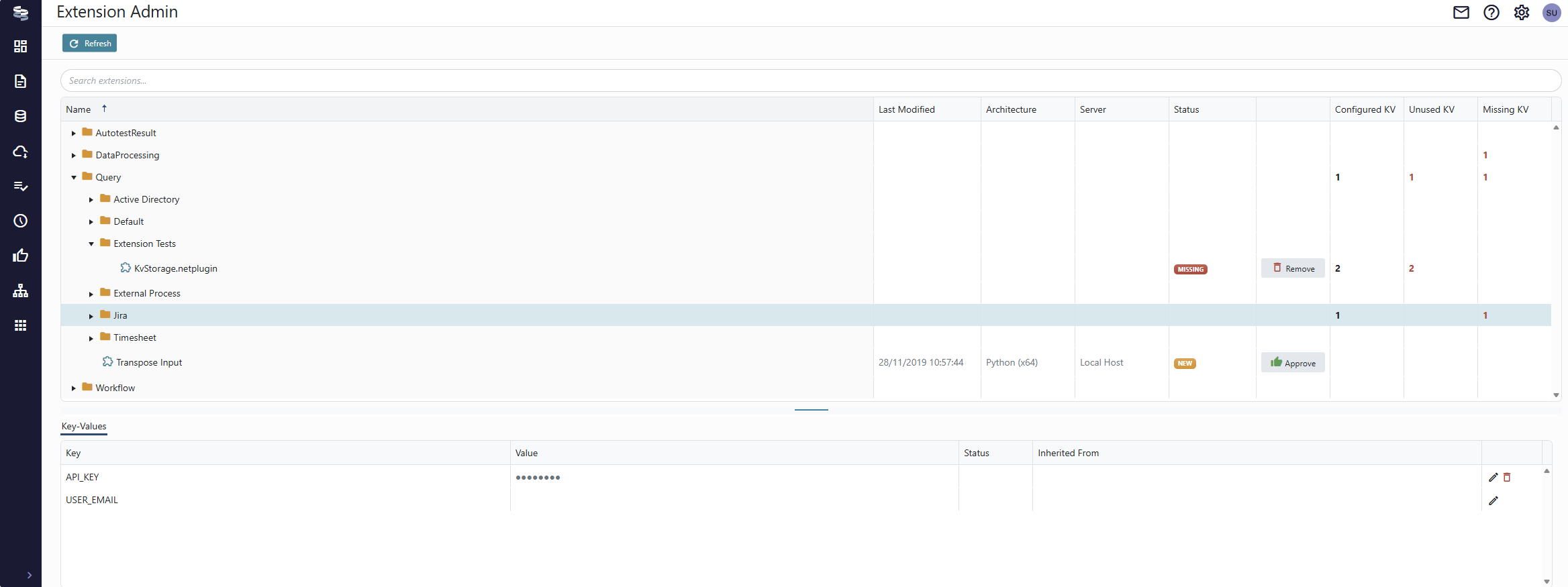
The Extension Admin page displays the extensions folder structure. The Status column shows the current status of extensions.
- New - An extension that is installed but not approved for use. (Users with Developer permission can still use the extension).
- Approved - The extension is approved.
- Missing - An extension that is approved for use, but has been uninstalled.
- Modified - The extension definition has been modified and is currently not usable *.
* When you approve and extension you approve that specific version of the extensions. If the extension is upgraded or modified in any way the approval isn't valid, and the extension must be approved again. This is a security feature to protect against accidental and malicious tampering with extensions.
Approving extensions
Only developers can use unapproved extensions. To approve an extension for general use, click the Approve button on the extension row.
An extension is approved per extension ID and a checksum. Upgrading or moving an extension invalidates the approval, and the extension must be approved again.
If you don't have the web portal set up yet, you can approve extensions using the OmniFi Administration desktop application.
Configuring Key Values
Key Values are parameters requested by extensions. This feature is commonly used to configure URLs, API keys and other properties that aren't suitable for hard-coding into the extension.
The three right-most columns in the upper panel show the number of parameters, or Key Values, are Configured/Unused/Missing. Note that the numbers are sum aggregates of Key Values of that category in the folder.
If and extension isn't working as you expected, make sure to check whether the configuration is missing any Key Values, or if a value configured on a root level intended for a different extension is applied.
Key Values are configured in the bottom pane. You can configure Key Values either for individual extensions, or on a folder. The later is convenient when a group of extensions target the same system, and require the same API key, for example.

The Status column shows if the Key Value is unused, and can be deleted.
Key Values are only provided to extensions that specifically require them. Even if you configure all storage values on the root level (e.g. Query), each value will only be provided to the extensions that actually require them, so values won’t leak between extensions. If two extensions use the same storage key, however, they will share the same value if it is configured on a common root folder.
Extension developers are encouraged to make they keys unique by using prefixes, but generic keys like API_KEY and ROOT_URL are sometimes used.
Always make sure to configure storage values on the appropriate level, typically the extension packages root folder.
Updated about 2 months ago