
Publishing endpoints to MCP
To publish and endpoint over MCP, you first have to make sure it is published to OmniFi Access and publish it to MCP using the MCP Visible switch.
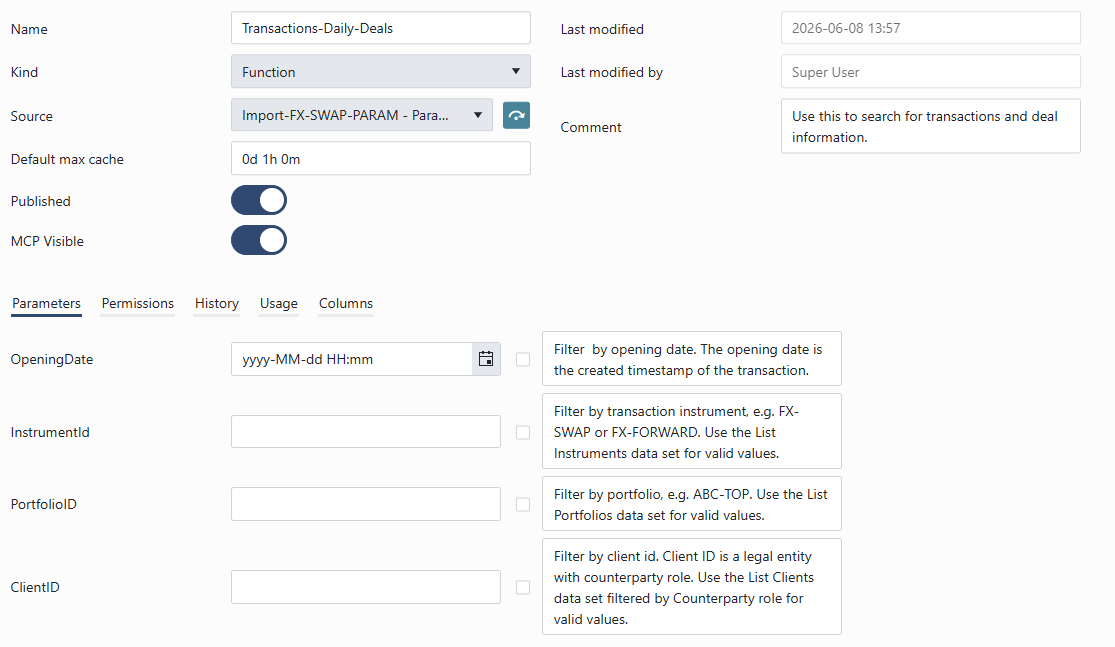
Note that for the LLM to properly infer the usage of the endpoint, naming conventions and comments are important.
- Make sure to name the endpoint unambiguously.
- Avoid publishing multiple endpoints with similar purposes.
- Parameterize the endpoint sufficiently to acquire focused data. Large Language Models have a limited context window, and dumping tens of thousands of records in it will quickly saturate the context window leading to hallucinations and expensive token costs.
- Provide an endpoint comment to clarify the purpose and usage of the endpoint.
- Endpoint, parameter and column names are visible to the model, so good and unambiguous naming is key. You can further enhance the models understanding of the data set by adding comments to parameters and columns. Do so as needed. Commenting a hundred columns adds significantly to the context size, which increases token costs and the risk of saturating the context window.
- Different models and model sizes behave differently. The amount of comments and instructions need to be optimized for your specific scenario using your specific model.
Updated 5 months ago
Did this page help you?