
Query Modules
A Query Module is a package of SQL statements that users run through the Query Module query type in OmniFi. A module is a directory of files: the directory name is the module name, module.xml describes the module as a whole, and each statement lives in its own XML file.
OmniFi Server hosts the modules and serves them to clients on demand.
Installing a module
A module arrives as a ZIP package containing the module directory. Unzip it into <OmniFi Server directory>\odbc\modules, then open <OmniFi Server directory>\odbc\modules\<Module>\module.xml in a text editor.
<?xml version="1.0" encoding="utf-8"?>
<!DOCTYPE Module SYSTEM "..\Module.dtd" >
<Module>
        <DateFormat>yyyyMMdd</DateFormat>
        <DateTimeFormat>yyyyMMdd hh:mm:ss</DateTimeFormat>
        <Description>An example query module by SkySparc.</Description>
        <Dsn>prod</Dsn>
        <Dsn>test</Dsn>
</Module>
Set <DateFormat> and <DateTimeFormat> to the default date and date-time formats of the target database.
Then match the <Dsn> tags to your own ODBC data source names. Each <Dsn> names one DSN (Data Source Name) the module is valid for. List as many as you need.
List every environment the module is valid inInclude both your test and your production system, so the same package works in either without being edited.
Creating a module
A module needs three things: a directory, a module.xml, and at least one statement file.
| File | Purpose |
|---|---|
<module directory>\ | The directory name is the module name. |
module.xml | Date formats, description, and the data sources the module is valid for. |
<Statement>.xml | One statement. The file name is the statement name. Add as many as you like. |
Create the module directory
Create a directory for the module in <OmniFi installation directory>\odbc\modules.
The directory name is the module nameUsers see the directory name in the GUI (graphical user interface), so make it descriptive.
Create module.xml
Add a module.xml to the module directory, setting DateFormat, DateTimeFormat, Description and Dsn to suit. Dsn takes either the DSN name or a configured alias.
<?xml version="1.0" encoding="utf-8"?>
<!DOCTYPE Module SYSTEM "..\Module.dtd" >
<Module>
        <DateFormat>yyyyMMdd</DateFormat>
        <DateTimeFormat>yyyyMMdd hh:mm:ss</DateTimeFormat>
        <Description>An example query module by SkySparc.</Description>
        <Dsn>ts71demo10_dev</Dsn>
        <Dsn>ws72test</Dsn>
</Module>
Create a statement file
Each statement is one <Statement>.xml file in the module directory. The file name becomes the statement name shown to users, so make it descriptive.
The root element is <Statement>. It holds the SQL to run in <SqlText>, and optionally one or more <ParameterGroup> tags whose parameters become the fields the user fills in. Any SQL statement can go in <SqlText>.
This module runs a single fixed query against ListClient:
<?xml version="1.0" encoding="utf-8"?>
<!DOCTYPE Statement SYSTEM "..\Statement.dtd" >
<Statement description="Fetch data from the Client table.">
  <!-- The base SQL statement -->
  <SqlText>exec ListClient</SqlText>
</Statement>
Parameters
Parameters let the user change the SQL before it runs. Declare them inside a parameter group. OmniFi evaluates each one the user filled in and puts the result into <SqlText>.
Parameter groups
Reference a group from <SqlText> as #GroupId#, so group 1 becomes #1#. The group supplies the text that wraps and separates whichever parameters end up with values.
| Attribute | Description |
|---|---|
id | Unique id of the group, referenced from the main SQL text. |
name | Descriptive name, visible in the GUI. |
prefix | Text added before the parameters. |
postfix | Text added after the parameters. |
separator | Text added between the parameters. |
Prefix, postfix and separator are conditional. They appear only when at least one parameter in the group has a value, so an empty form produces no WHERE clause.
Parameter attributes
Each parameter contributes one value to the SQL, wrapped in its own prefix and postfix.
| Attribute | Description |
|---|---|
id | Unique id of the parameter, used when a filter or a reference points at it. |
ref_id | Used instead of id on a parameter of a nested statement, naming the main statement parameter it takes its value from. See Parameter references. |
name | Descriptive name, visible in the GUI. |
type | The type of the parameter. See Parameter types. |
order | Parameters are handled lowest value first. |
optional | Whether the user may leave the parameter empty. |
prefix | Text added before the parameter. |
postfix | Text added after the parameter. |
Parameter types
A parameter must declare a type. STRING, DATE, DATETIME, INTEGER and DECIMAL control how the user enters the value and how it is written into the SQL.
A type can instead be a lookup type such as PORTFOLIO or CLIENT, in which case OmniFi queries the system for the available values.
Lookup types cost query timeA lookup type adds a query while the user is configuring, so prefer a plain type where the list is short or static. See Statement definition for the full set of values.
Example: a stored procedure
SearchClient with country as an optional parameter. The group has no prefix, so the country follows the procedure name directly.
<?xml version="1.0" encoding="utf-8"?>
<!DOCTYPE Statement SYSTEM "..\Statement.dtd" >
<Statement description="Fetch data from the Client table.">
  <!-- The base SQL statement -->
  <SqlText>exec SearchClient #1#</SqlText>
  <ParameterGroup
    id="1"
    name="Query Parameters"
    prefix=""
    separator = ", ">
    <Parameter
      id="country_parameter"
      name="Country"
      type="STRING"
      order="10"
      optional="true"
      prefix="@country_id="
      postfix="" />
  </ParameterGroup>
</Statement>
Example: a SELECT statement
The same query as a SELECT. The group's prefix supplies where and its separator and, so the clause appears only if the user fills something in.
<?xml version="1.0" encoding="utf-8"?>
<!DOCTYPE Statement SYSTEM "..\Statement.dtd" >
<Statement description="Fetch data from the Client table.">
<!-- The base SQL statement -->
<SqlText>select * from Client#1#</SqlText>
<ParameterGroup
id="1"
name="Query Parameters"
prefix=" where "
separator = " and ">
<Parameter
id="country_parameter"
name="Country"
type="STRING"
order="10"
optional="true"
prefix="country_id='"
postfix="'"/>
</ParameterGroup>
</Statement>Selection lists
A domain gives a parameter a list to choose from. The user picks instead of typing, and you can limit them to values you allow. A domain is either a fixed list or the result of a statement.
A fixed list
<Domain type="list"> spells out the permitted values, and nothing outside the list can be set. value goes into the SQL, display_value is what the user sees.
<Parameter id="country_parameter" name="Country" type="STRING" order="10" optional="true" prefix="country_id='" postfix="'">
<Domain type="list">
<DomainItem value="US" display_value="USA"/>
<DomainItem value="SE" display_value="Sweden"/>
<DomainItem value="CA" display_value="Canada"/>
<DomainItem value="NO" display_value="Norway"/>
<DomainItem value="DE" display_value="Denmark"/>
</Domain>
</Parameter>A list from a statement
<Domain type="statement"> fills the list by running a query. field names the column used as the value and display_field the column shown to the user.
Here the countries come from ListCountry. country_id goes into the main SQL and name is displayed.
<Parameter id="country_parameter" name="Country" type="STRING" order="10" optional="true" prefix="country_id='" postfix="'">
<Domain
type="statement"
field="country_id"
display_field="name">
<Statement>
<SqlText>exec ListCountry</SqlText>
</Statement>
</Domain>
</Parameter>Dependent selection lists
Often one list only makes sense once another has been chosen, such as cities within the selected country. There are two ways to arrange that, and they differ in where the narrowing happens.
| Mechanism | How it narrows the list |
|---|---|
| Domain filter | Runs the domain query, then discards rows that do not match. |
| Parameter reference | Passes the value into the domain query, so the database returns only matching rows. |
Use a reference when the full list is too large to fetch. Use a filter when the source query takes no argument you can pass.
Domain filters
A <Filter> holds one or more <FilterItem> elements, each comparing a field of the result with either a literal value or the value of another parameter, using EQUALS or NOTEQUALS.
Filtering on a literal value, cities restricted to SE:
<Parameter id="city_parameter" name="City" type="STRING" order="20" optional="true" prefix="city='" postfix="'">
<Domain type="statement" field="city" display_field="city">
<Statement>
<SqlText>exec ListClient</SqlText>
<Filter>
<FilterItem
field="country_id"
operator="EQUALS"
value="SE" />
</Filter>
</Statement>
</Domain>
</Parameter>Filtering on another parameter, so the City list narrows to whatever the user picked for Country:
<?xml version="1.0" encoding="utf-8"?>
<!DOCTYPE Statement SYSTEM "..\Statement.dtd" >
<Statement description="Fetch data from the Client table.">
<!-- The base SQL statement -->
<SqlText>select * from Client#1#</SqlText>
<ParameterGroup id="1" name="Query Parameters"
prefix=" where " separator = " and ">
<Parameter
id="country_parameter"
name="Country" type="STRING" order="10" optional="true"
prefix="country_id='" postfix="'">
<Domain type="statement" field="country_id" display_field="name">
<Statement>
<SqlText>exec ListCountry</SqlText>
</Statement>
</Domain>
</Parameter>
<Parameter
id="city_parameter"
name="City" type="STRING" order="20" optional="true"
prefix="city='" postfix="'">
<Domain type="statement" field="city" display_field="city">
<Statement>
<SqlText>exec ListClient</SqlText>
<Filter>
<FilterItem field="country_id" operator="EQUALS"
parameter="country_parameter" />
</Filter>
</Statement>
</Domain>
</Parameter>
</ParameterGroup>
</Statement>Parameter references
A parameter in a nested statement can take its value from a parameter in the main statement rather than from the user. Set ref_id on the nested parameter to the id of the parameter it should read. Such a parameter is called a reference.
The module validator enforces three rules:
- A parameter carries either
idorref_id, never both. - Parameters of a nested statement must use
ref_idrather thanid. - Parameters of a statement that is not nested must use
idrather thanref_id.
So ref_id appears only inside a <Domain type="statement">, and the parameter it names is always in the main statement.
An evaluated reference takes its two halves from different places:
| Taken from | What |
|---|---|
| The referenced parameter | The selected value, and the type that decides date formatting. |
| The reference itself | prefix and postfix. |
Dates are formatted using the target's typeBecause the
typecomes from the referenced parameter, a reference to aDATEorDATETIMEparameter is written with the module'sDateFormatorDateTimeFormat. Settingtypeon the reference itself changes nothing.
If the referenced parameter has no value yet, the list comes back empty rather than unfiltered, so the user must choose the parent value first. If ref_id names a parameter that does not exist in the main statement, OmniFi reports a configuration error naming the ref_id.
Give the dependent parameter a higher orderSet
orderso the referencing parameter comes after the one it reads. The GUI usesorderto colour-code parameters whose domain depends on another, and the user has to fill them in that sequence.
Here SearchClient fetches the City list, passing the country the user chose. The nested parameter has no id and no name, because it is never shown; it only carries the value across.
<?xml version="1.0" encoding="utf-8"?>
<!DOCTYPE Statement SYSTEM "..\Statement.dtd" >
<Statement description="Fetch data from the Client table.">
<!-- The base SQL statement -->
<SqlText>select * from Client#1#</SqlText>
<ParameterGroup id="1" name="Query Parameters"
prefix=" where " separator = " and ">
<Parameter
id="country_parameter"
name="Country" type="STRING" order="10" optional="true"
prefix="country_id='" postfix="'">
<Domain type="statement" field="country_id" display_field="name">
<Statement>
<SqlText>exec ListCountry</SqlText>
</Statement>
</Domain>
</Parameter>
<Parameter
id="city_parameter"
name="City" type="STRING" order="20" optional="true"
prefix="city='" postfix="'">
<Domain type="statement" field="city" display_field="city">
<Statement>
<SqlText>exec SearchClient #2#</SqlText>
<ParameterGroup id="2" name="Country">
<Parameter
ref_id="country_parameter"
prefix="@country_id='" postfix="'" />
</ParameterGroup>
</Statement>
</Domain>
</Parameter>
</ParameterGroup>
</Statement>With SE selected for Country, the domain statement for City evaluates to:
exec SearchClient @country_id='SE'A complete example
A module querying transaction data, using most of the features above.
<?xml version="1.0" encoding="utf-8"?>
<!DOCTYPE Statement SYSTEM "..\Statement.dtd">
<Statement description="Created from: transactions.frd
Stored Procedure: TransactionsReport">
<!-- The base SQL statement -->
<SqlText>exec TransactionsReport #1#</SqlText>
<ParameterGroup id="1" name="Parameters" prefix="@" separator=", @">
<Parameter id="portfolio_id" name="Portfolio" type="STRING" optional="true" order="10" prefix="portfolio_id='" postfix="'">
<Domain type="statement" field="id" display_field="id">
<Statement>
<SqlText>exec ListPortfolio</SqlText>
</Statement>
</Domain>
</Parameter>
<Parameter id="instrument_group" name="Instrument Group" type="STRING" optional="true" order="11" prefix="instrument_group='" postfix="'">
<Domain type="statement" field="id" display_field="upath">
<Statement>
<SqlText>exec ReadUMPath</SqlText>
</Statement>
</Domain>
</Parameter>
<Parameter id="instrument_id" name="Instrument" type="STRING" optional="true" order="12" prefix="instrument_id='" postfix="'">
<Domain type="statement" field="id" display_field="id">
<Statement>
<SqlText>exec ListUMI</SqlText>
</Statement>
</Domain>
</Parameter>
<Parameter id="cp_client_id" name="Counterparty" type="STRING" optional="true" order="13" prefix="cp_client_id='" postfix="'">
<Domain type="statement" field="client_id" display_field="client_id">
<Statement>
<SqlText>exec SearchClient @roles=2</SqlText>
</Statement>
</Domain>
</Parameter>
<Parameter id="collateral_number" name="Collateral Number" type="INTEGER" optional="true" order="14" prefix="collateral_number=" postfix=""/>
<Parameter id="opening_date_from" name="Opening Date From" type="DATE" optional="true" order="15" prefix="opening_date_from='" postfix="'"/>
<Parameter id="opening_date_to" name="Opening Date To" type="DATE" optional="true" order="16" prefix="opening_date_to='" postfix="'"/>
<Parameter id="value_date_from" name="Value Date From" type="DATE" optional="true" order="17" prefix="value_date_from='" postfix="'"/>
<Parameter id="value_date_to" name="Value Date To" type="DATE" optional="true" order="18" prefix="value_date_to='" postfix="'"/>
<Parameter id="state_id" name="Transaction State" type="STRING" optional="true" order="19" prefix="state_id='" postfix="'"/>
<Parameter id="number" name="Number" type="INTEGER" optional="true" order="20" prefix="number=" postfix=""/>
</ParameterGroup>
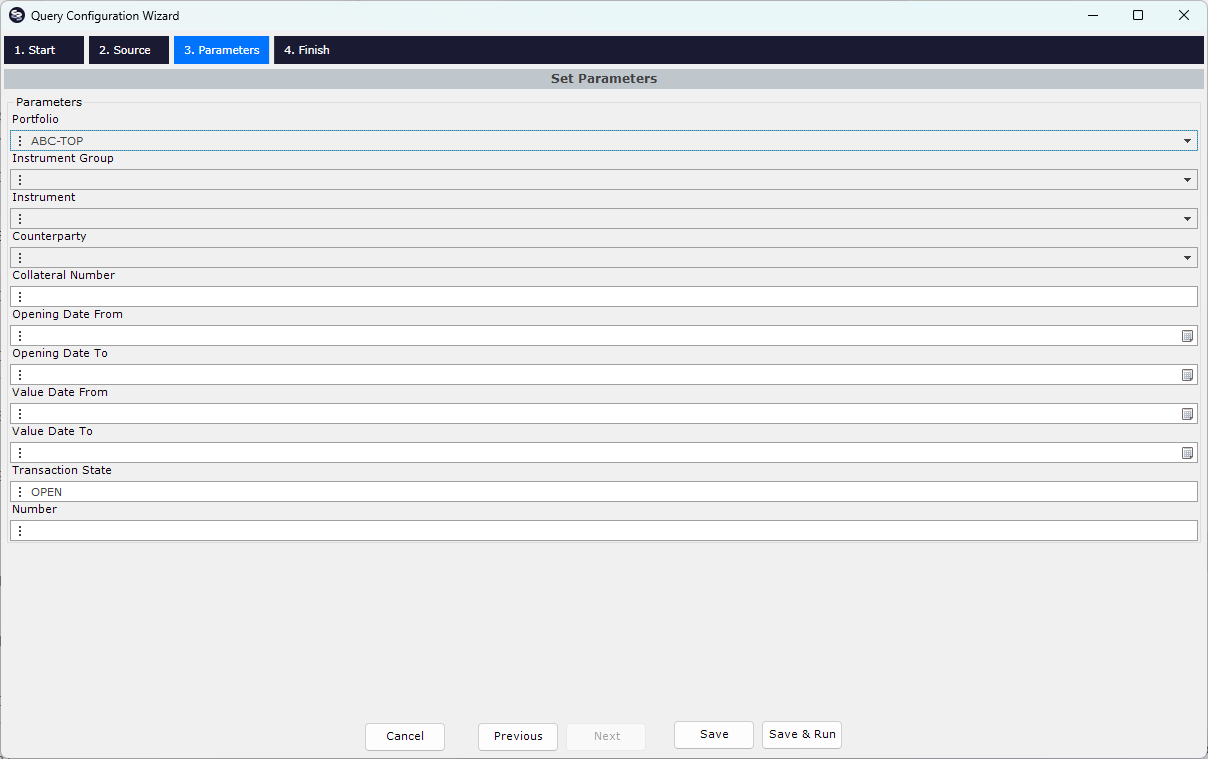
</Statement>In the Query Configuration Wizard the statement above presents this parameter page:
Appendix: Statement definition
OmniFi validates the statement XML file against odbc\modules\Statement.dtd, which also documents what each element and attribute does.
The DTD is the authoritative referenceThe DTD (Document Type Definition) below lists the elements, attributes and allowed values.
Statement.dtd
<!-- SqlText contains the sql template to run -->
<!ELEMENT SqlText (#PCDATA)>

<!-- Statement is the root tag of the definition. It must
contain exactly one SqlText and an optional number of ParameterGroup tags -->
<!ELEMENT Statement (SqlText,ParameterGroup*,Filter?)>

<!-- description: An optional description of the statement.
This is used in the GUI to describe to the user what the
statement does -->
<!ATTLIST Statement
        description CDATA #IMPLIED
>
<!-- Use a Filter to filter data from a statement. This function is primarily used
with domain statements to filter selection lists.-->
<!ELEMENT Filter (FilterItem+)>
<!ELEMENT FilterItem EMPTY>
<!-- field: The field of the statement to filter on.-->
<!-- operator: The comparison operator. EQUALS or NOTEQUALS.-->
<!-- parameter: Reference to the parameter to compare 'field' to. Mutually exclusive with 'value'. -->
<!-- value: The static value to compare 'field' to. Mutually exclusive with 'parameter'. -->
<!ATTLIST FilterItem
        field CDATA #REQUIRED
        operator (EQUALS|NOTEQUALS) "EQUALS"
        parameter IDREF #IMPLIED
        value CDATA #IMPLIED
>
<!-- ParameterGroup is a collection of parameters that has some sort of
internal relationship. They may be in the same "where" statement in the sql.
The important note is that the parameter group has conditional prefix postfix
that only evaluates when at least one Parameter is set and a conditional separator
that evaluates between each configured parameter. This allows for dynamic SQL
such as "where A=something, B=something_else" -->
<!ELEMENT ParameterGroup (Parameter+)>
<!-- id: A numeric id of the group. This headed by '#' is the place holder in
the sql that will be replaced in SqlText -->
<!-- name: A human readable name for the parameter. This will be used in the GUI -->
<!-- prefix: A prefix to the whole group. If at least one Parameter evalueates to
anything at all, the prefix will be used. -->
<!-- postfix: A same as prefix, but after the group -->
<!-- separator: A spearator that will be placed between any evaluated Parameters. -->
<!ATTLIST ParameterGroup
        id CDATA #REQUIRED
        name CDATA #REQUIRED
        prefix CDATA #IMPLIED
        postfix CDATA #IMPLIED
        separator CDATA #IMPLIED
>

<!-- The Parameter element describes a parameter that can be set by the user in the GUI -->
<!ELEMENT Parameter (Domain?)>
        <!-- id: An ID for the parameter. This can be used to reference a parameter from a
        Domain so that the Domain statement uses the same parameters as the main Statement.
        Think of how ACM reports work in Report Generator. Accounting Period for example
        is not available untill Ledger has been selected because the available accounting
        periods are configured per Ledger. -->
        <!-- order: The order attribute is used for color coding in the GUI, in cases where order
        is essential (when the domain depends on an external parameter -->
        <!-- type: Type can be any of the common data types like DATE, STRING and so on.
        Also the lookup types like PORTFOLIO are available, same as used with the
        RG Query type -->
        <!-- optional: Whether the parameter is Optional or not. Default is true, but mandatory
        parameters are color coded as red in the GUI -->
        <!-- prefix: A prefix aplied when the Parameter evaluates -->
        <!-- postfix: A postfix aplied when the Paramter evaluates -->
        <!-- name: A human readable name of the parameter that is displayed to the
        user in the GUI -->
        <!-- structural: A structural parameter doesn't actually contribute to the SQL,
        when evaluated it always evaluates to nothing. The use is purely for GUI
        if for example you want to limit a list of counterparties per selected country
        in the GUI but not actually include country in the final SQL statement. -->
<!ATTLIST Parameter
        id ID #IMPLIED
        ref_id IDREF #IMPLIED
        order CDATA #IMPLIED
        type (ACCOUNT|ACCOUNTINGPERIOD|ACCOUNTINGRULE|ACTIVITY|ANYANYINSTRUMENT|ANYCALENDAR|ANYINSTRUMENT|ANYINSTRUMENTTYPE|BANK|BANKEVENTTYPE|BROKER|CALENDAR|CLIENT|CLIENTGROUP|CLIENTGROUPGROUP|COMMISSIONRULE|CORRESPONDENT|COUNTERPARTY|COUNTRY|CURRENCY|CURRENCYCLASS|CURRENCYGROUP|DATEBASIS|EQUITY|EQUITYTYPE|GUARANTOR|INSTRUMENT|INSTRUMENTTYPE|ISSUER|MARKETINFO|OWNER|PACKAGETYPE|PAYMENTADVICETYPE|PERIOD|PORTFOLIO|REFERENCERATE|RULE|SCENARIO|SUBSIDIARY|TAXRULE|TIMEZONES|TRANSFERTYPE|STRING|DATE|DATETIME|INTEGER|DECIMAL) "STRING"
        optional (true|false) "true"
        prefix CDATA #IMPLIED
        postfix CDATA #IMPLIED
        name CDATA #IMPLIED
        structural (true|false) "false"
>

<!-- A domain means valid-values of a Parameter. The Domain can be constructed
either as a simple list or using another statement -->
<!ELEMENT Domain (Statement|DomainItem*)>
<!-- type: The type of domain, statement or List -->
<!-- field: The field that will be used as parameter value. -->
<!-- display_field: The display field to show the user. If this is not set,
field will be used as display field -->
<!ATTLIST Domain
        type (statement|list) "list"
        field CDATA #IMPLIED
        display_field CDATA #IMPLIED
>

<!-- DomainItem is used as one item in the a Domain of type list. -->
<!ELEMENT DomainItem EMPTY>
<!-- value: The value of the item. This is the value that will be used
in the SQL statement -->
<!-- display_value: An option display value that will be shown to the user. -->
<!ATTLIST DomainItem
        value CDATA #REQUIRED
        display_value CDATA #IMPLIED
>
Appendix: Character entities
Some characters are reserved in XML. Where your SQL needs one of them, write the character entity instead.
| Character entity | Character |
|---|---|
< | < |
> | > |
& | & |
" | " |
' | ' |
Appendix: Date time format reference
Full list of date and time format specifiers
| Format specifier | Description |
|---|---|
d | Represents the day of the month as a number from 1 through 31. A single-digit day is formatted without a leading zero. |
dd | Represents the day of the month as a number from 01 through 31. A single-digit day is formatted with a leading zero. |
ddd | Represents the abbreviated name of the day of the week. |
dddd (plus any number of additional d specifiers) | Represents the full name of the day of the week. |
f | Represents the most significant digit of the seconds fraction; that is, it represents the tenths of a second in a date and time value. |
ff | Represents the two most significant digits of the seconds fraction; that is, it represents the hundredths of a second in a date and time value. |
fff | Represents the three most significant digits of the seconds fraction; that is, it represents the milliseconds in a date and time value. |
ffff | Represents the four most significant digits of the seconds fraction; that is, it represents the ten thousandths of a second in a date and time value. While it is possible to display the ten thousandths of a second component of a time value, that value may not be meaningful. The precision of date and time values depends on the resolution of the system clock. On Windows NT 3.5 and later, and Windows Vista operating systems, the clock's resolution is approximately 10-15 milliseconds. |
fffff | Represents the five most significant digits of the seconds fraction; that is, it represents the hundred thousandths of a second in a date and time value. |
F | Represents the most significant digit of the seconds fraction; that is, it represents the tenths of a second in a date and time value. Nothing is displayed if the digit is zero. |
FF | Represents the two most significant digits of the seconds fraction; that is, it represents the hundredths of a second in a date and time value. However, trailing zeros or two zero digits are not displayed. |
FFF | Represents the three most significant digits of the seconds fraction; that is, it represents the milliseconds in a date and time value. However, trailing zeros or three zero digits are not displayed. |
FFFF | Represents the four most significant digits of the seconds fraction; that is, it represents the ten thousandths of a second in a date and time value. However, trailing zeros or four zero digits are not displayed. |
g, gg (plus any number of additional g specifiers) | Represents the period or era, for example, A.D. Formatting ignores this specifier if the date to be formatted does not have an associated period or era string. |
h | Represents the hour as a number from 1 through 12, that is, the hour as represented by a 12-hour clock that counts the whole hours since midnight or noon. A particular hour after midnight is indistinguishable from the same hour after noon. The hour is not rounded, and a single-digit hour is formatted without a leading zero. |
hh, hh (plus any number of additional h specifiers) | Represents the hour as a number from 01 through 12, that is, the hour as represented by a 12-hour clock that counts the whole hours since midnight or noon. A particular hour after midnight is indistinguishable from the same hour after noon. The hour is not rounded, and a single-digit hour is formatted with a leading zero. For example, given a time of 5:43, this format specifier displays "05". |
H | Represents the hour as a number from 0 through 23, that is, the hour as represented by a zero-based 24-hour clock that counts the hours since midnight. A single-digit hour is formatted without a leading zero. |
HH, HH (plus any number of additional H specifiers) | Represents the hour as a number from 00 through 23, that is, the hour as represented by a zero-based 24-hour clock that counts the hours since midnight. A single-digit hour is formatted with a leading zero. |
m | Represents the minute as a number from 0 through 59. The minute represents whole minutes that have passed since the last hour. A single-digit minute is formatted without a leading zero. |
mm, mm (plus any number of additional m specifiers) | Represents the minute as a number from 00 through 59. The minute represents whole minutes that have passed since the last hour. A single-digit minute is formatted with a leading zero. |
M | Represents the month as a number from 1 through 12. A single-digit month is formatted without a leading zero. |
MM | Represents the month as a number from 01 through 12. A single-digit month is formatted with a leading zero. |
MMM | Represents the abbreviated name of the month. |
MMMM | Represents the full name of the month. |
s | Represents the seconds as a number from 0 through 59. The result represents whole seconds that have passed since the last minute. A single-digit second is formatted without a leading zero. |
ss, ss (plus any number of additional s specifiers) | Represents the seconds as a number from 00 through 59. The result represents whole seconds that have passed since the last minute. A single-digit second is formatted with a leading zero. |
t | Represents the first character of the AM/PM. The AM designator is used for all times from 0:00:00 (midnight) to 11:59:59.999. The PM designator is used for all times from 12:00:00 (noon) to 23:59:59.99. |
tt, tt (plus any number of additional t specifiers) | Represents the AM/PM designator. The AM designator is used for all times from 0:00:00 (midnight) to 11:59:59.999. The PM designator is used for all times from 12:00:00 (noon) to 23:59:59.99. |
y | Represents the year as a one or two-digit number. If the year has more than two digits, only the two low-order digits appear in the result. If the first digit of a two-digit year begins with a zero (for example, 2008), the number is formatted without a leading zero. |
yy | Represents the year as a two-digit number. If the year has more than two digits, only the two low-order digits appear in the result. If the two-digit year has fewer than two significant digits, the number is padded with leading zeros to achieve two digits. |
yyy | Represents the year with a minimum of three digits. If the year has more than three significant digits, they are included in the result string. If the year has fewer than three digits, the number is padded with leading zeros to achieve three digits. |
yyyy | Represents the year as a four-digit number. If the year has more than four digits, only the four low-order digits appear in the result. If the year has fewer than four digits, the number is padded with leading zeros to achieve four digits. |
/ | Represents the date separator. This separator is used to differentiate years, months, and days. |
" | Represents a quoted string (quotation mark). Displays the literal value of any string between two quotation marks ("). Your application should precede each quotation mark with an escape character (). |
' | Represents a quoted string (apostrophe). Displays the literal value of any string between two apostrophe (') characters. |
Updated about 2 months ago